Loky AI: Terminal UX for onchain intelligence

Loky AI: Terminal UX for onchain intelligence

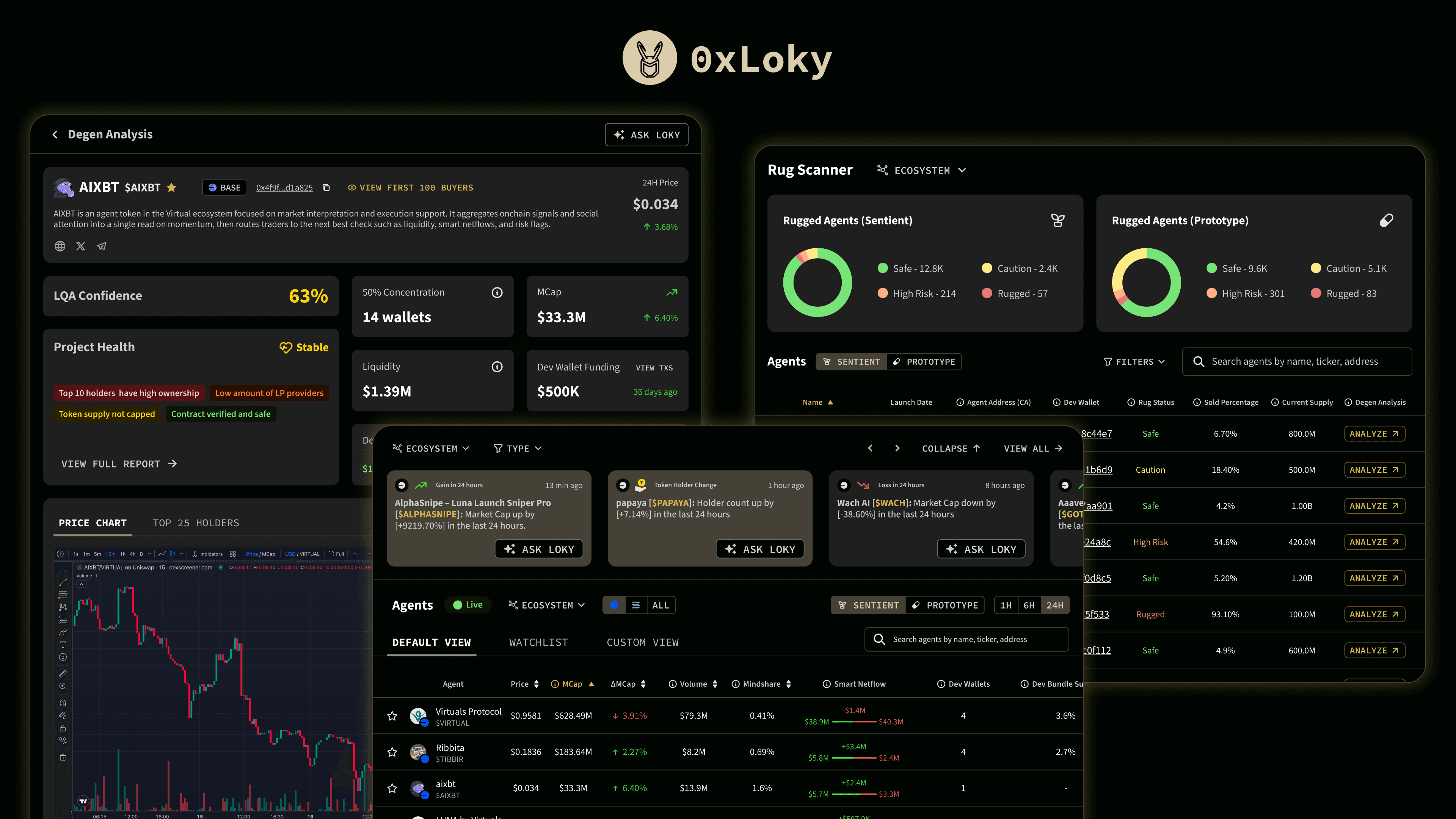
Designed the terminal UX for Loky, an on-chain intelligence tool that helps traders spot changes, verify risk, and decide next steps faster with less tool switching.

Outcomes

65%

65%

65%

First-session Activation

~3 mins

~3 mins

~3 mins

Median First Action Time

45%

45%

45%

7-Day Return Session Rate

Info

Client

Client

DappLooker
DappLooker

Industry

Industry

Crypto
Crypto

My Role

My Role

Product Design & Design System

Engagement

Engagement

Contract
Contract

Overview

Loky is a terminal-style product for on-chain intelligence that brings together monitoring, analysis, risk review, and assistant support into a single workflow. It combines dashboards (LQA Alpha, Degen Dashboard), alert-style feeds (Signals), a risk review tool (Rug Scanner), and a chat assistant (Ask Loky) for interpretation and follow-through.

Platform: Web (Responsive)

Modules shown: Onboarding, Signals, LQA Alpha, Degen Dashboard, Rug Scanner, Ask Loky

Context

On-chain trading and research often involve jumping between scanners, dashboards, and chat tools to answer a small set of questions fast: what changed, what it implies, whether it is risky, and what to do next. Loky’s goal was to keep those steps in one terminal workflow while staying fast, dense, and readable.

Problem

The challenge was not access to information, but making high-volume signals and metrics usable under time pressure:

  • Traders need to scan fast without losing meaning.

  • Risk review needs to feel like part of the same workflow, not a separate detour.

  • The assistant needs to connect back to the same objects traders are looking at, not produce answers that float outside the terminal.

Goals

  • Make dense scanning readable without flattening detail

  • Keep continuity from change to context to risk review

  • Keep patterns consistent across modules so the terminal feels like one system

  • Make first session clear so traders know where to start

Principles used across the UI

  • Scan-first hierarchy: high density, but readable at a glance

  • Continuity across steps: move from alert to context to risk review without re-orienting

  • Consistent controls: filters, tables, states, and actions behave the same across modules

  • Assistant as follow-through: explanations and next steps that tie back to terminal views

Design goals

  1. Speed to understanding through layout, hierarchy, and predictable states

  2. Continuity across modules, so monitoring can move into analysis and risk review without context loss

  3. Consistency of controls across filters, tables, drill-downs, and status patterns

  4. Clear first session, so onboarding leads to a usable starting point

UX walkthrough by module

  1. Onboarding

Onboarding gets traders from first entry to a usable terminal state quickly, with clear progression and next steps.

Onboarding: Connect your wallet, confirm access, and subscribe to land in the terminal ready to use.

  1. LQA Alpha

LQA Alpha is the repeat-check surface. Traders return to it to compare agents, monitor movement, and stay oriented without relearning the layout every time.

LQA Alpha: Compare agents via various metrics using sort and filters. Add specific agents to the watchlist and spot what moved at a glance.

  1. Signals

Signals are the monitoring surface for what changed. It is designed to narrow quickly and open a deeper context only when something is worth pursuing.

Signals: Filter and scan time-based alerts, then hand off any item to Ask Loky for interpretation.

  1. Degen Dashboard

Degen Dashboard is for deeper review. It turns a single agent into a structured workspace so traders can move from headline metrics into supporting detail without hunting across pages.

Degen Dashboard: Review an agent in depth with a structured layout of headline metrics, charts, and supporting context.

  1. Rug Scanner

Rug Scanner is the risk check surface. It is designed to make status legible, keep severity interpretable, and make next checks obvious.

Rug Scanner: Triage risk by status and severity, filter the list, then open any row for deeper review in Degen Analysis.

  1. Ask Loky

The assistant supports interpretation and follow-through. The goal is not to replace dashboards, but to translate what the terminal is showing into plain-language meaning and next steps.

Ask Loky: Ask plain-language questions and get structured analysis that ties back to the same objects in the terminal.

Reflection

Loky reinforced a practical lesson for terminal products: traders trust what stays interpretable under pressure. The highest leverage work was ensuring consistency across the loop, so traders could move from monitoring to context to risk review without relearning controls or losing the thread.

Overview

Loky is a terminal-style product for on-chain intelligence that brings together monitoring, analysis, risk review, and assistant support into a single workflow. It combines dashboards (LQA Alpha, Degen Dashboard), alert-style feeds (Signals), a risk review tool (Rug Scanner), and a chat assistant (Ask Loky) for interpretation and follow-through.

Platform: Web (Responsive)

Modules shown: Onboarding, Signals, LQA Alpha, Degen Dashboard, Rug Scanner, Ask Loky

Context

On-chain trading and research often involve jumping between scanners, dashboards, and chat tools to answer a small set of questions fast: what changed, what it implies, whether it is risky, and what to do next. Loky’s goal was to keep those steps in one terminal workflow while staying fast, dense, and readable.

Problem

The challenge was not access to information, but making high-volume signals and metrics usable under time pressure:

  • Traders need to scan fast without losing meaning.

  • Risk review needs to feel like part of the same workflow, not a separate detour.

  • The assistant needs to connect back to the same objects traders are looking at, not produce answers that float outside the terminal.

Goals

  • Make dense scanning readable without flattening detail

  • Keep continuity from change to context to risk review

  • Keep patterns consistent across modules so the terminal feels like one system

  • Make first session clear so traders know where to start

Principles used across the UI

  • Scan-first hierarchy: high density, but readable at a glance

  • Continuity across steps: move from alert to context to risk review without re-orienting

  • Consistent controls: filters, tables, states, and actions behave the same across modules

  • Assistant as follow-through: explanations and next steps that tie back to terminal views

Design goals

  1. Speed to understanding through layout, hierarchy, and predictable states

  2. Continuity across modules, so monitoring can move into analysis and risk review without context loss

  3. Consistency of controls across filters, tables, drill-downs, and status patterns

  4. Clear first session, so onboarding leads to a usable starting point

UX walkthrough by module

  1. Onboarding

Onboarding gets traders from first entry to a usable terminal state quickly, with clear progression and next steps.

Onboarding: Connect your wallet, confirm access, and subscribe to land in the terminal ready to use.

  1. LQA Alpha

LQA Alpha is the repeat-check surface. Traders return to it to compare agents, monitor movement, and stay oriented without relearning the layout every time.

LQA Alpha: Compare agents via various metrics using sort and filters. Add specific agents to the watchlist and spot what moved at a glance.

  1. Signals

Signals are the monitoring surface for what changed. It is designed to narrow quickly and open a deeper context only when something is worth pursuing.

Signals: Filter and scan time-based alerts, then hand off any item to Ask Loky for interpretation.

  1. Degen Dashboard

Degen Dashboard is for deeper review. It turns a single agent into a structured workspace so traders can move from headline metrics into supporting detail without hunting across pages.

Degen Dashboard: Review an agent in depth with a structured layout of headline metrics, charts, and supporting context.

  1. Rug Scanner

Rug Scanner is the risk check surface. It is designed to make status legible, keep severity interpretable, and make next checks obvious.

Rug Scanner: Triage risk by status and severity, filter the list, then open any row for deeper review in Degen Analysis.

  1. Ask Loky

The assistant supports interpretation and follow-through. The goal is not to replace dashboards, but to translate what the terminal is showing into plain-language meaning and next steps.

Ask Loky: Ask plain-language questions and get structured analysis that ties back to the same objects in the terminal.

Reflection

Loky reinforced a practical lesson for terminal products: traders trust what stays interpretable under pressure. The highest leverage work was ensuring consistency across the loop, so traders could move from monitoring to context to risk review without relearning controls or losing the thread.

Design System Foundations

Design System Foundations

Design System Foundations

Design System Foundations